Simply5 Network Devices · Manage and reach every device
Every device on your network, manageable remotely from one place
Network devices is the part of the console for everything plugged in behind your Simply5 Gateway. Access points and switches are configured for you and kept that way. Cameras, recorders, printers and door controllers are watched, and opened remotely when you need them.
One licence per device, paid once
Remote access and Managed are one-time licences that never renew. They work on a site with an active Simply5 subscription.
How it fits together
A remote view goes from your console to one device and nowhere else, through the Simply5 Gateway already at your site.
Watch a remote view open
Recorded in the Simply5 site console, on a sample site.
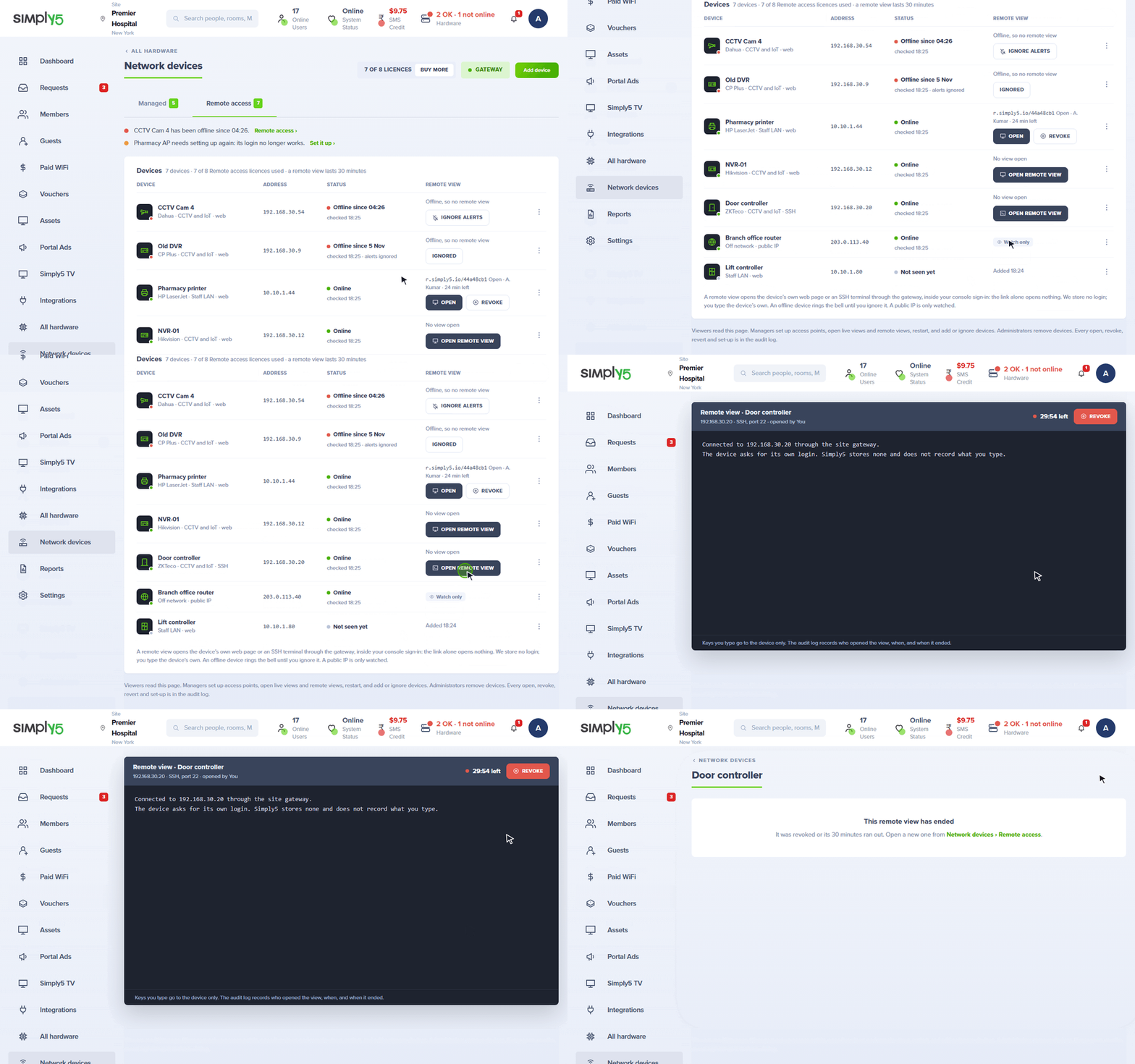
In the console
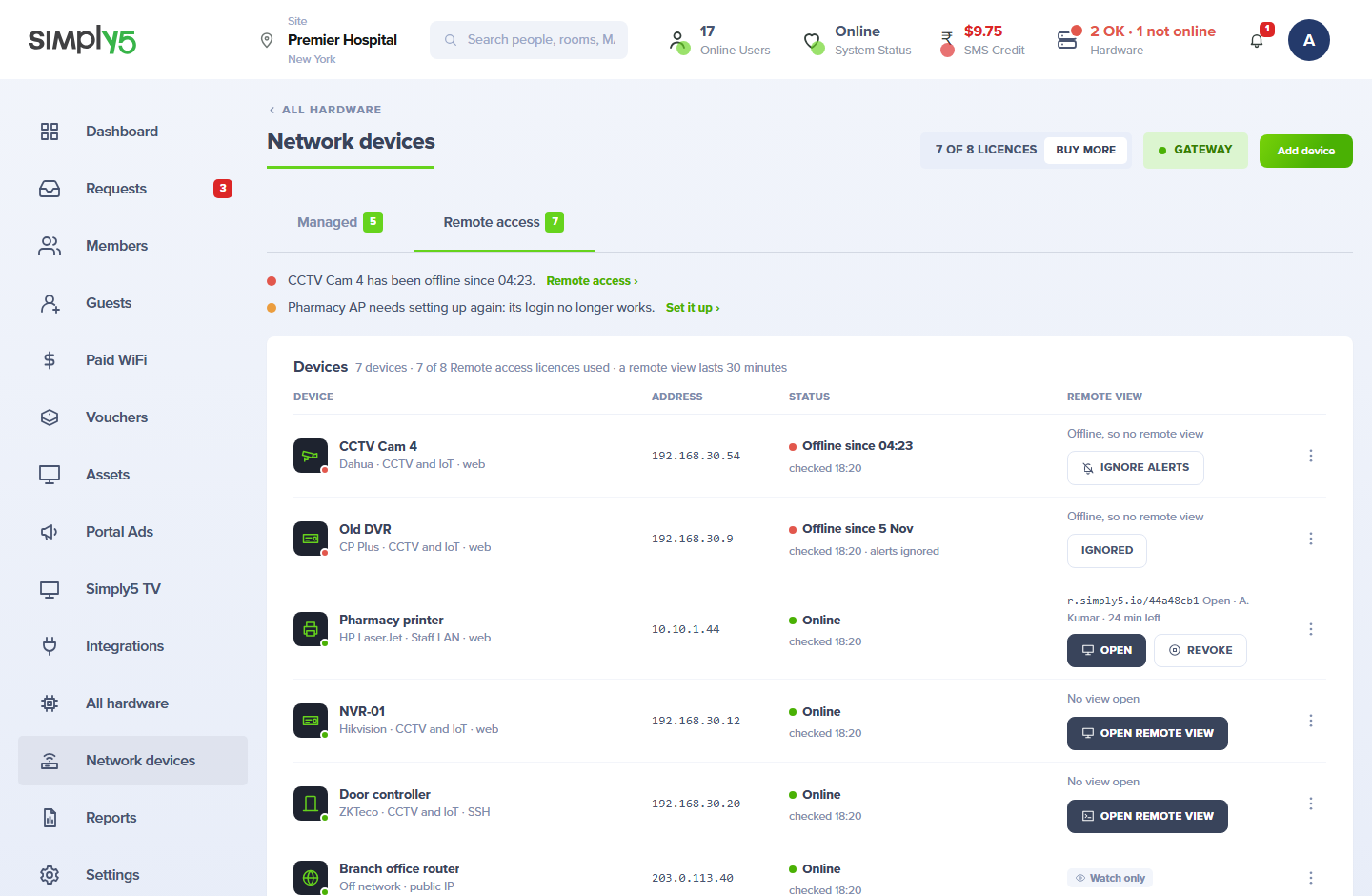
These are screens of the Simply5 site console itself, showing a sample site.
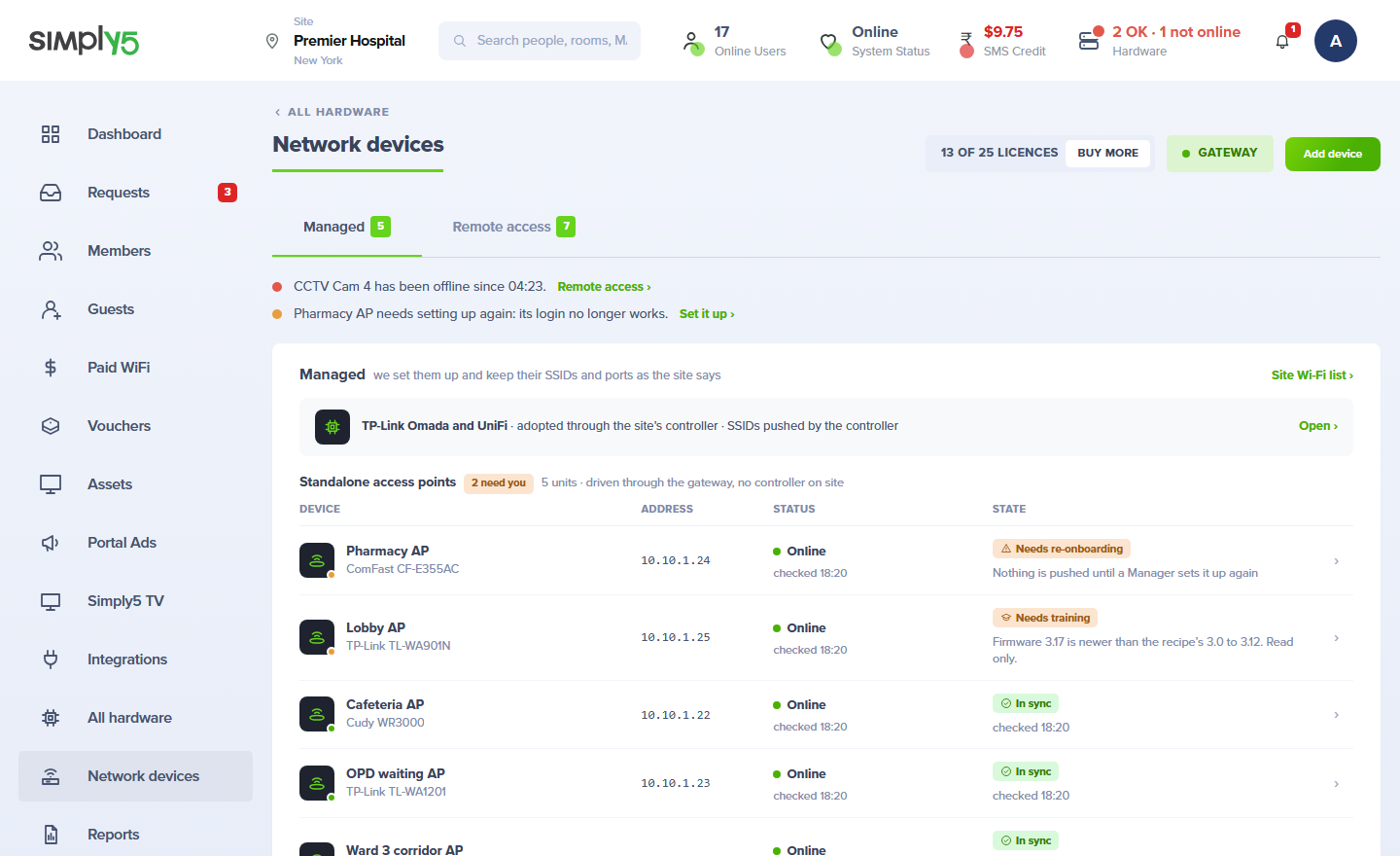
Devices Simply5 configures for you
Your WiFi networks and port settings are written to each device and checked afterwards, whether a controller runs it or not.
Controller devices
TP-Link Omada access points and switches are adopted onto the Simply5 Hosted Controller and take their settings from your console.
Standalone access points
An access point with no controller is managed too. Simply5 signs in to its own admin page from the cloud and sets it, following a tested recipe for that model.
Kept in line
WiFi networks and port settings are checked every day. If someone changed one on the device, it is put back at once and you are told what changed.
Live control
For anything else, drive the access point’s own admin page from the console for up to 30 minutes. Its password is never shown to you.
States in plain words
Each device reads Applied, Needs re-onboarding or Unreachable, with the time it was last checked, so you know which one needs a person.
More models over time
A model we do not support yet says so and joins our list. Each new model is added once and then works at every site.
Devices you watch and reach
Some devices are not Simply5’s to configure. You still want to know they are up, and to open them without driving to the site.
Anything on your network
Camera recorders, cameras, printers, door controllers and phone systems. Add each one by name and address.
Online or offline
Every device shows whether it is online, and since when it has been offline.
An alert when one drops
One alert per outage, in the console and by email, which clears itself when the device is back. A device can be set to Ignore.
Remote view in your browser
Open a device’s own web page or an SSH terminal from the console, for up to 30 minutes. No VPN to set up and no port to forward.
Your logins stay yours
You type the device’s own login in the remote view. Simply5 does not see it and stores nothing.
Hosts outside the site
A server at a public address can be watched and alerted on too. It is watch-only: there is no remote view to it.
Who may open what, and a record of it
Reaching into a network remotely has to be safe by default.
Roles decide
A viewer only reads. A manager onboards devices and opens live control and remote views. Only an admin removes a device.
A link alone opens nothing
A remote view works only inside a signed-in console session of someone with access to that site. Revoke ends it early.
Every session is recorded
Who opened a remote view or live control, on which device and when, is kept in the site’s audit record.
Nothing left open
The path from the cloud to a device is opened for one session and closes when it ends.
Goes with
The gateway is the start. These add the devices behind it to the same console.
Access points and switches
Simply5 Hosted Controller
Add device licences to a Simply5 site and we host the controller for your TP-Link Omada access points and switches. You adopt them, set your WiFi networks and manage switch ports in the same console as your Simply5 Gateway. There is no controller to install, update or back up.
Simply5 Hosted Controller in detailThe gateway
Simply5 Business Router
Every managed device sits behind a Simply5 Gateway, which stays in charge of sign-in, limits and routing.
Simply5 Business Router in detailTwo licences, by what you want done
A device takes one licence. Each licence is bought once, never renews and stays with the site.
Remote access
Watch a device and open it remotely
Per device, paid once
- Online status and alerts
- Web and SSH remote view
- Bought in any quantity
Managed
Have Simply5 configure the device
In packs, paid once
- Access points and switches
- Settings written and kept in line
- Packs of 5, 10, 25 and 50
Your own controller
You already run an Omada controller
One flat licence a year
- Every device on your controller
- One flat licence, no packs
From order to live
- 1
Open Network devices
In your site console, under hardware. It lists what your Simply5 Gateway already sees on the network.
- 2
Add a device
Choose Managed for an access point or switch, or Remote access for anything else.
- 3
Confirm it
Pick the device from the list and name it. Its address is reserved so it stays where it is.
- 4
Leave it to the console
Managed devices take your settings. Remote access devices are watched, and open when you ask.
What you get
Included
- One list of every device behind your Simply5 Gateway
- Settings kept in line on managed devices
- Online status and alerts for every device
- Remote view by web and SSH, for 30 minutes at a time
- Roles and an audit record
- Licences that never renew
Order online in India. Hardware ships to your site, ready to plug in.
Ready when you are.
Order online and your Simply5 Gateway ships already tagged to your order, ready to plug in.
Order online in India. Hardware ships to your site, ready to plug in.