Simply5 Hosted Controller · Access points and switches
Your access points and switches, on a controller we run
Add device licences to a Simply5 site and we host the controller for your TP-Link Omada access points and switches. You adopt them, set your WiFi networks and manage switch ports in the same console as your Simply5 Gateway. There is no controller to install, update or back up.
Licence packs start from ₹6,000
Licences come in packs of 5, 10, 25 and 50 and never renew. They work on a site with an active Simply5 subscription. Prices are in the online shop.
How it fits together
The controller lives in the cloud. Your Simply5 Gateway and the devices behind it stay at your site.
In the console
These are screens of the Simply5 site console itself, showing a sample site.
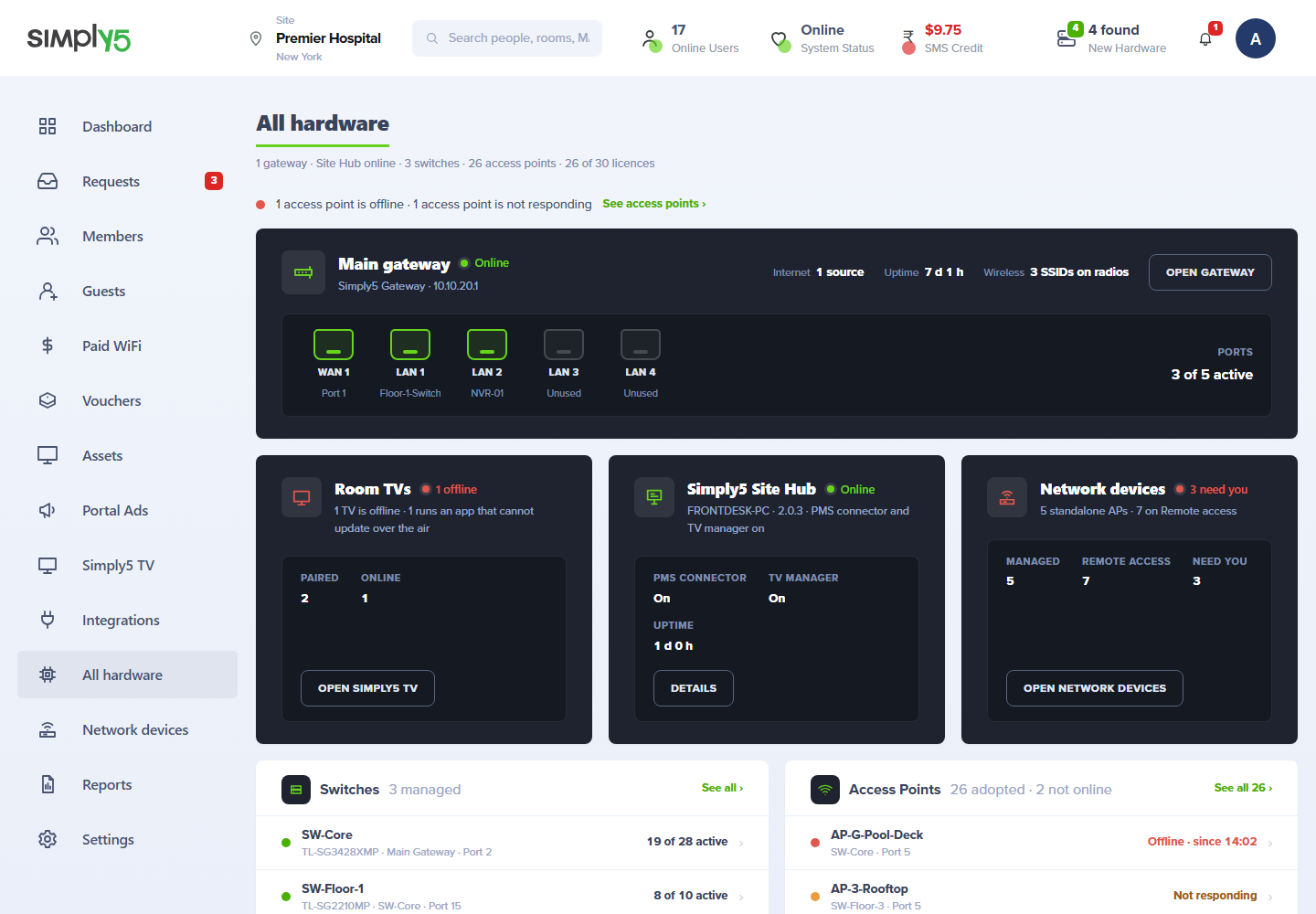
WiFi across the whole building, set in one place
An access point is a radio on your network. The Simply5 Gateway stays in charge of sign-in, limits and routing, so nothing changes for the people who connect.
Find and adopt
The console lists the access points waiting on your network. Press Adopt and it shows the progress, or a plain reason if it fails.
One list of WiFi networks
Name, password, bands, hidden or not, and the network each one belongs to. The same list drives the gateway’s own radios and every access point.
The same sign-in everywhere
A person who joins through an access point meets the same sign-in page, the same limits and the same licence as one who joins at the gateway.
Restart and locate
Restart a unit from the console, or make its light blink so an installer can find it on the ceiling.
Status and alerts
Name, model, state, address and firmware for every unit. One that stays offline raises an alert and clears it when it returns.
Bring your own hardware
Use the Omada access points and switches you already own. Only the licences are bought from Simply5.
Switch ports in plain words
A managed switch is adopted the same way, and its ports are set from your site’s own list of networks. Nobody is asked to think in profiles.
Ports at a glance
Each port’s name, whether it is linked, its role, the networks it carries and what is plugged into it.
Trunk or access
A trunk port carries every network of the site; an access port carries one. Choose the role and Simply5 writes the switch settings.
Power per port
Switch PoE off and on for one port, so a hung access point or camera can be power-cycled without a site visit.
A protected uplink
The port that connects the switch to the gateway is named at setup and cannot be switched off without a second confirmation.
Hosted by us, or on a controller you run
Most sites use the controller Simply5 hosts. A site that already runs its own keeps it.
Hosted by Simply5
We run, update and back up the controller. Your site is made on it automatically when you switch the feature on.
Your own controller
Already running an Omada controller? One flat yearly licence covers every access point and switch on it.
An engineer when you want one
Have a Simply5 engineer set up your own controller on a call, charged per call.
If a subscription lapses
Your devices keep broadcasting what they last received. Changes wait until you renew, and your licences are kept.
Every site on one screen
Simply5 Central shows how many access points are online at each site, beside the gateway’s own health.
Ubiquiti UniFi is next
The hosted controller runs TP-Link Omada today. UniFi is being added; you can register interest now.
Goes with
The gateway is the start. These add the devices behind it to the same console.
Manage and reach every device
Simply5 Network Devices
Network devices is the part of the console for everything plugged in behind your Simply5 Gateway. Access points and switches are configured for you and kept that way. Cameras, recorders, printers and door controllers are watched, and opened remotely when you need them.
Simply5 Network Devices in detailThe gateway
Simply5 Business Router
Every managed device sits behind a Simply5 Gateway, which stays in charge of sign-in, limits and routing.
Simply5 Business Router in detailDevice licence packs
One licence per access point or switch. A pack is bought once, never renews and stays with the site. Packs start from ₹6,000, and a larger pack costs less per device. Each pack’s price is in the online shop.
5 devices
A shop, a clinic or a small office
Paid once, never renews
- 5 access points or switches
- Stays with the site
10 devices
A restaurant or a floor of offices
Paid once, never renews
- 10 access points or switches
- Stays with the site
25 devices
A hotel or a hostel block
Paid once, never renews
- 25 access points or switches
- Stays with the site
50 devices
A campus or a hospital
Paid once, never renews
- 50 access points or switches
- Stays with the site
From order to live
- 1
Buy a licence pack
From the shop, or from the Billing page of your site console.
- 2
Plug in your devices
Connect the access points and switches to the network behind your Simply5 Gateway.
- 3
Adopt them
They appear in the console as found. Adopt each one; it takes a licence from your pack.
- 4
Save and push
Set your WiFi networks and switch ports once. Every device takes its settings from there.
What you get
Included
- A controller hosted, updated and backed up by Simply5
- Adoption, status and alerts for access points and switches
- One list of WiFi networks for the whole site
- Switch port roles and PoE control
- Device health in Simply5 Central
- Licences that never renew
Order online in India. Hardware ships to your site, ready to plug in.
Ready when you are.
Order online and your Simply5 Gateway ships already tagged to your order, ready to plug in.
Order online in India. Hardware ships to your site, ready to plug in.